
Everything MotoTigo does for you on the road
From voice commands to talking with Maya, five route types and SOS. Discover the full power of your travel companion.

Idea
Do you, like me, wonder right after setting off whether you've planned the route well — and whether your destination will be open by the time you get there? Or where to buy socks along the way, because you've just realised you forgot to pack them?
Of course, the last thing you want to do right now is pull over and look it up online.
The MotoTigo app is exactly for me — and I hope for you too.
You get a handful of standard voice commands. With them you'll handle ninety percent of the travel-related things you do on your phone.
And when you want to know more, you switch on Maya with the voice command “Turn on Maya” and ask whatever you like. Maya can browse the internet in the background, so she has access to everything.
Once you've talked your fill: “Turn off Maya” — and blissful peace of mind returns.
I really wrote this app for myself. I test it intensively. Without false modesty — I'm no slouch when it comes to IT and cross-system integrations, hence the idea. And the thought: why didn't I come up with it sooner...
Take care!
Jacek
Trip journal
The app is built around the idea of the trip.
By default there's a “Round the block” trip running, and that's where all the information tied to your navigation goes.
When you set off on a longer trip, you simply create it in the app. Now you can add voice notes, which are saved to the trip journal as text under the right days of the calendar.
You can add photos — they're saved on your phone, so you have them at hand even without coverage. And from the Pro plan you back them up to MotoTigo's servers, so you can be sure they won't get lost (unlike my photos from the Scotland trip with Majka...). The app is connected to your camera, so you can add photos straight from your phone's gallery.
This is how you build your trip journal — and the best part is you don't have to do it in the evening, when the only thing you dream of is bed. Everything happens by voice, without touching the keyboard.
Plan routes with stops on the trip map — in the app and on the portal. Add stops, reorder them and pick the route type; every trip participant sees the routes. From the Pro plan you can export them to a GPX file or load a track from GPX — from your phone or from trip files.
The trip functionality will certainly keep being developed intensively.
GPS track
Full background route recording: distance, time, trace.
Voice notes
Recordings turned into text via transcription.
Photos
A photo gallery tied to every trip.
Trip routes and GPX
Plan routes with stops on the trip map and export them to GPX (from the Pro plan).
A trip map like Google Maps
The trip map is more than your route and your points. One tap in the menu shows what's around — from restaurants and fuel stations to landmarks, viewpoints and campsites.
You can look around before you get there: with the Diamond plan, Street View shows a street-level panorama and roads with imagery are highlighted in blue.
Heading somewhere new? With Diamond, a bottom strip shows photos from the area you're looking at on the map — and a line points to where each was taken.
Looking for a motorbike rental, a hotel or a tyre shop? Switch the search box to “Services”, type what you need and see results from the area you are viewing. From the Gold plan up they appear in MotoTigo, with pins on the map and a place card; on lower plans the search opens in Google Maps.
Points of interest in 7 groups
Food, attractions, nature, shopping, transport, health and services — tick what interests you and the points appear in group colours.
Place card with photos
Click a point to see its description, photos, rating, opening hours, phone and website — and add it to your trip with one button.
Google or OpenStreetMap
Every plan uses OpenStreetMap data with Wikipedia descriptions; from Gold you can switch the source to Google Places.
Street View
With Diamond, click a road to see a 360° panorama — roads with Street View imagery are highlighted in blue.
Photos nearby
With Diamond, open a bottom strip of photos from the visible map area — your trip photos, Google and Wikimedia Commons. Hover a photo and a line shows where it was taken.
Terrain, topo and satellite
With Diamond, the layers button switches the map to terrain with contour lines and relief shading, a topographic map or satellite view.
Service search
Switch the search box to “Services” and type anything, e.g. “motorbike rentals”. From the Gold plan, Google results from the visible area appear on the map; on lower plans the search opens in Google Maps.
Region search
From the Pro plan, switch the search to “Regions”, type a name, e.g. “Manipur” or “Bavaria”, and see the region’s borders highlighted. In the app you can also download an overview map of it for offline use.
Expenses on a trip with others
You travel together, but everyone has their own budget. On a shared trip your expenses are yours alone: nobody else can see them, not even the trip owner. You can add them without worrying that anyone is watching.
And when someone pays for others? Mark it as a shared expense, choose who it is for, and the app works out who owes whom so that everyone covers their part of the cost.
Your expenses are private
Everyone sees only what they added themselves. Others see neither amounts, descriptions nor totals.
Shared with the people you choose
Dinner for just two? Choose who the expense is for. The rest of the group pays nothing, but everyone on the trip can see the shared expense. Marking from the Gold plan.
A clear settlement
See who owes whom in each currency, with an approximate amount in your own currency. After repaying, tap “Paid back”: the app only records it and makes no transfer.
Links, Maya and materials in every trip
Every trip has its own place for what you collect before you leave, on the road and after you return: videos and articles, questions for Maya, and materials for a book or a longer blog post. All of it works in the app and on the portal.
Links
YouTube videos, Facebook reels and websites in expandable categories. A click opens the link on its platform, and all trip participants see the same links. On every plan, unlimited.
Conversation with Maya
Type or dictate, and Maya answers knowing this trip’s data. The conversation is saved, you can delete entries, and on a shared trip each person has their own private conversation. On the Diamond plan.
Materials
Notes, links, photos and documents such as PDFs, in your own categories. Only you can see them, even on a shared trip. On the Diamond plan.
On the road, out of range
In the mountains, on a high pass, abroad with no roaming — coverage disappears exactly when something worth writing down happens.
MotoTigo keeps working anyway. You dictate and save notes as usual, photos land on your phone, and whatever is waiting to be sent goes out on its own the moment you're back online. Nothing for you to remember.
And if you want the map with you too — from the Pro plan you download a chosen area to your phone and navigate it completely without the internet.
Notes without internet
Dictate and save notes where there's no coverage — they land in your journal right away.
Automatic sync
Once your phone finds a signal, notes upload themselves. No buttons, no waiting.
Photos on your device
Trip photos are saved on your phone and you can browse them offline. Cloud backup comes with the Pro plan.
Offline maps
From the Pro plan you download map areas to your phone: Pro 2 areas, Gold 5, Diamond 10.
Tigo — basic commands
When I travel with Tigo, our interaction goes like this: “Tigo, let's go”… and that's pretty much it ;-) Sometimes I'll ask: “Tigo, show the map”, or point out where we're heading, and Tigo takes it into account right away.
If you want to travel in peace and have all the basics covered without constantly stopping and tapping your phone screen, you're going to love travelling with Tigo.

Maya — a conversation about anything
Your voice travel companion. You talk to her naturally, and she uses tools — like browsing the web in the background — to genuinely help.
And if you're one of those singing artists who belt it out “into the helmet” on the road but only remember “Hej, hej sokoły…”, Maya will remind you of the rest of the lyrics — and won't tell anyone how wonderfully you sing, so you won't have to fend off fans for the rest of the ride…
Maya adapts to your travel mode — she looks after you one way on a motorcycle, another in a car. While she is speaking, you can interrupt her any time with the “Stop” button on screen.
Nearby places
Finds restaurants, fuel and attractions along the way.
Where am I
Tells you where you currently are.
Weather
Checks the weather here and elsewhere.
Local knowledge
Suggests trivia and sights along the route.
How to use the app
Speak to the agent normally — not too fast and not too slow. Use a rather firm tone.
Practise first with the basic commands, like “show map” and “close map”.
Once you get the hang of it, practise the basic navigation commands, such as “find on the map” followed by an address. Don't inflect city names — just say, for example: “Find on the map Ciechanów, Zamkowa 1”.
Then say: “Let's go” and navigation should start.
You'll find the full list of commands in the app and further down this page.
Practise at home first, then in the car when you can, and once you feel confident and handle the app smoothly, start testing it on the motorcycle.
Remember to set new routes only while stopped. Our safety matters most. A minute's stop costs you nothing — you'll do it quickly anyway, without touching the phone, and calmly double-check the new route.
Ride safe and good luck!
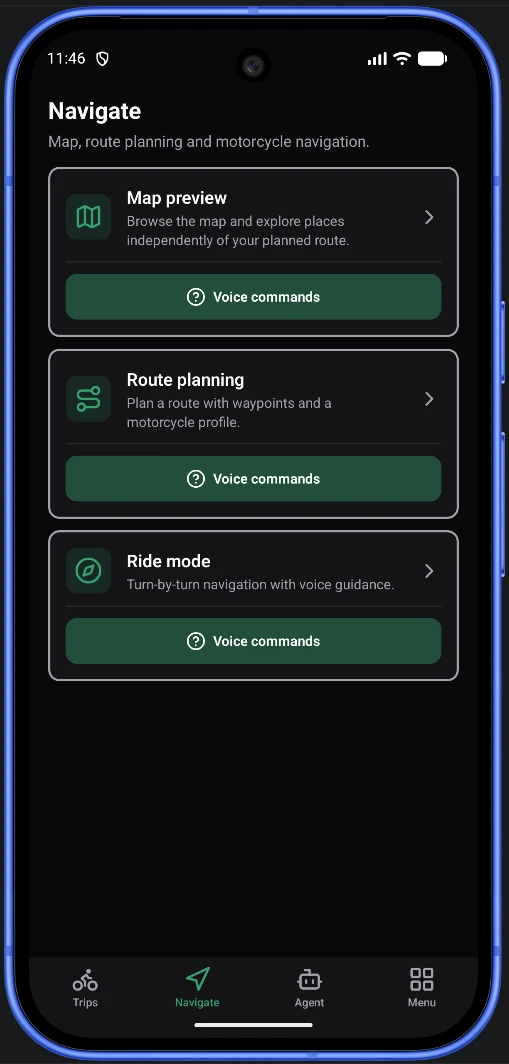
Four languages, one journey
MotoTigo and Maya speak English, Polish, German and Spanish.
You choose the app's language and Maya talks to you in the same one — wherever the road takes you.
Voice control
Voice commands for Tigo — all without touching the screen.
Map
„show map”
Opens the map preview.
„close map”
Closes the map preview.
„find on the map Zamość, Ormiańska Street 1”
Searches an address and drops a pin.
„one / two / three”
Picks a result from the list.
„let's go”
Starts riding to the pin.
„center”
Centers the map on your position.
„zoom in / zoom out”
Changes the zoom level.
„pan east / west / north / south”
Moves the map in the given direction.
„full screen”
Hides the panels — only the map stays (preview, route, ride).
Route & navigation
„show route”
Shows the full route on the map.
„close route”
Closes the route preview.
„navigate”
Starts or resumes navigation.
„navigate to Sopot”
Plans a route from your position to the named place and sets off.
„how far”
Tells you the remaining distance and time.
„close navigation”
Closes the navigation screen — navigation keeps running.
„end navigation”
Ends navigation and clears the route.
„record the route”
Starts recording your ridden GPS route (Pro plan).
„stop recording”
Stops and saves the recorded ride.
Agent & notes
„turn off agent”
Stops listening for commands (ends the session).
„add a note”
Starts a voice note.
„end note”
Saves the note with a transcription.
Weather & music
„show weather”
Weather for your location.
„show weather in Kraków”
Weather for a named place.
„close weather”
Closes the weather screen.
„play music”
Plays or resumes music.
While music plays, voice listening is paused — control pause and track skipping with the intercom buttons or on screen. Pause or stop resumes listening.
Screen & voice
„screen on / off”
Controls the screen.
„turn on / turn off voice”
Mutes navigation announcements.
Maya
„turn on Maya”
Once Maya is on, you can talk to her like a travel companion. Discuss anything, ask whatever you like. Maya finds all the information on the internet for you in the background and answers by voice.
„turn off Maya”
When you want to travel on in silence…
Maya is available on the Gold and Diamond plans.
Ready for your first ride with MotoTigo?
Install the app and be among the first to hit the road.
Get the app